
The Outbox and Inbox Pattern in .NET 10 with EF Core and PostgreSQL
Saving data and publishing an event are two separate writes, and sooner or later one of them fails. Here is how the outbox and inbox patterns fix that with EF Core and PostgreSQL.

Why these patterns exist
Most systems today are not one application. An order service, a payment service, an invoicing service and a notification service each own their own data, and they tell each other what happened by sending messages through a broker like RabbitMQ or Azure Service Bus.
That works well until one message goes missing or arrives twice. Then the problems are not technical anymore. A customer pays with mobile money, the money leaves their account, but the service that sends the receipt never hears about it, so they call support thinking they were robbed. Or a loan disbursement message is delivered twice, and the same customer gets paid out twice. Bugs like these do not crash anything. You find them weeks later in a reconciliation report, or when a customer complains.
The outbox and inbox patterns exist because a database and a broker cannot share one transaction. The outbox makes sure a message is never lost when the data is saved. The inbox makes sure a message that arrives twice is only acted on once. Together, they let separate services agree on what happened, even when pods restart and networks fail.
Here is where it goes wrong in code.
The bug in two lines
A lot of event-driven .NET code looks like this:
It looks fine and the tests pass. In production, it will eventually drop an event without telling you.
Say the pod restarts, or the broker is down for ten seconds, right after SaveChangesAsync. The order is in the database, but the event never leaves the process. The customer is never invoiced and no confirmation email goes out. Nothing threw an exception, so there is no error in the logs to find.
Swapping the two lines gives you the opposite bug. The event goes out, the save fails, and another service starts working on an order that does not exist.
This is the dual write problem. You write to your database and to your broker, and no transaction covers both. The outbox pattern fixes the sending side, and the inbox pattern fixes the receiving side.
The outbox: make the event part of the transaction
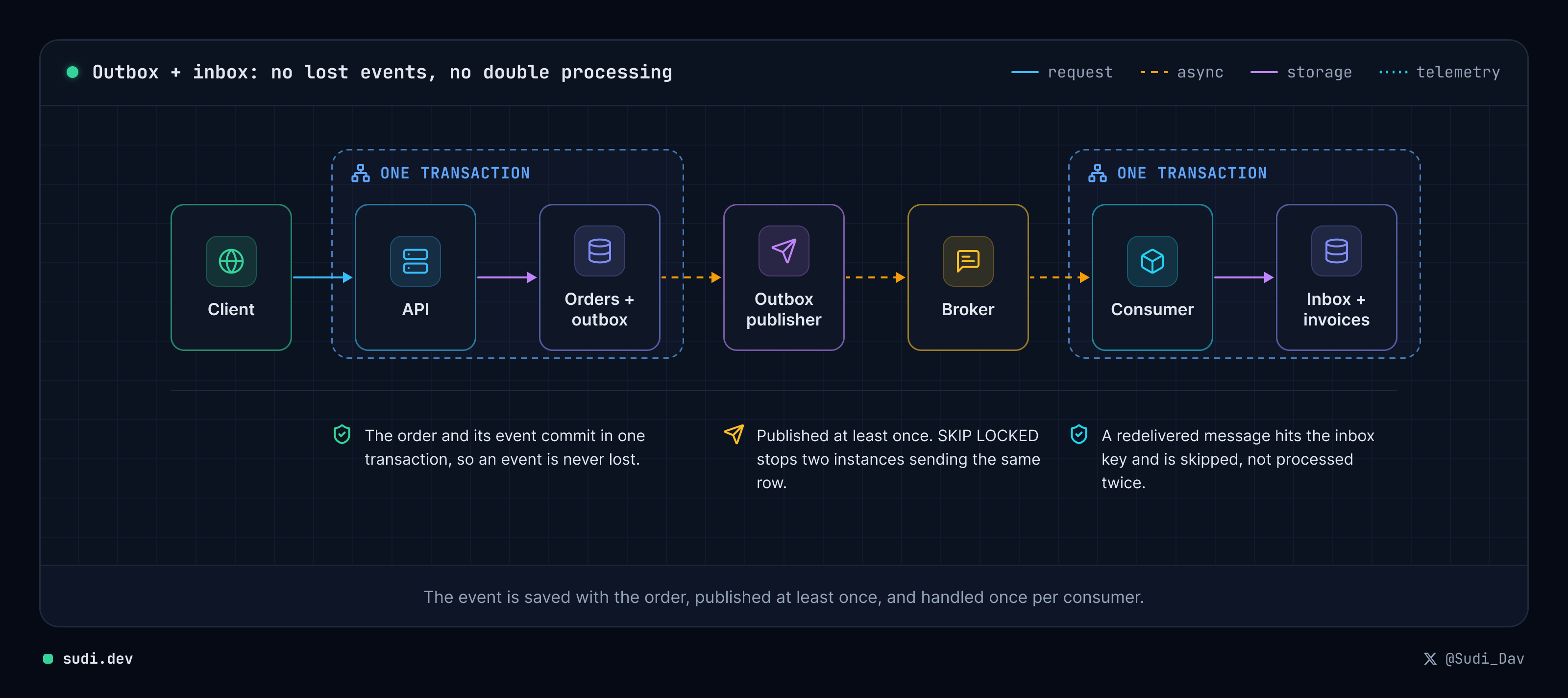
Instead of publishing the event directly, you save it to a table in the same database, in the same transaction as the order. Either both rows are saved or neither is.
Guid.CreateVersion7() gives you time-ordered IDs. New rows land at the end of the primary key index instead of at random places in it, which keeps inserts cheap.
In the model, I store the payload as jsonb and add a partial index that only covers messages that have not been sent yet. The index stays small even when the table holds millions of old rows.
The SQL in this post uses snake_case names like outbox_messages and processed_at. EF Core does not create those by default. It would name the table OutboxMessages and the column ProcessedAt. So the sample registers the context with UseSnakeCaseNamingConvention() from the EFCore.NamingConventions package:
If you leave that line out, the partial index and the raw SQL fail with "relation does not exist".
The endpoint has no broker call at all:
EF Core wraps one SaveChangesAsync call in one database transaction. If it succeeds, the order and its event are both on disk. If it fails, neither is. You now have one write instead of two.
Sending what is in the outbox
Something still has to move those rows to the broker. For most systems, a BackgroundService that polls the table every second is enough:
The line that matters is FOR UPDATE SKIP LOCKED. You probably run more than one instance of your API. Without that line, two instances read the same rows and publish every event twice. With it, each instance locks the rows it picked, and the other instances skip those rows and take the next ones. PostgreSQL handles the coordination, so you do not need a distributed lock.
FromSql with an interpolated string still sends BatchSize as a SQL parameter, not as raw text.
When a publish fails, the publisher never gives up on the row. It records the error and schedules the next attempt with exponential backoff: 2 seconds, then 4, then 8, up to a cap of five minutes (MaxBackoff). Then it stops the batch, because the most common cause of a failure is the broker being down, and sending the next rows would fail too.
An earlier version of this code skipped rows after five failed attempts. I tested it by taking the broker down for eight seconds. Every pending row hit five attempts, and when the broker came back, none of them were ever sent. With backoff instead of a cap, the same outage ended with all three orders invoiced.
Now look at the order of operations. The publisher sends the message, marks the row as processed, and then commits. If the app dies after sending but before the commit, the row is still unprocessed, and the next run sends it again. So the outbox does not give you exactly-once delivery. It gives you at-least-once delivery. You never lose a message, but some messages arrive twice.
That is why the consumer side needs an inbox.
The inbox: make consumers safe to run twice
Brokers create duplicates too. RabbitMQ, Azure Service Bus and Kafka all redeliver a message when an acknowledgment gets lost. Your consumer has to expect any message to arrive more than once.
The inbox is a table that records which messages each consumer has already handled. Its primary key combines the message ID and the consumer name:
The consumer claims the message first, and does the real work only if the claim succeeds:
When the message was already handled, ON CONFLICT DO NOTHING affects 0 rows. You get no exception to catch, and no race between a "check" query and an "insert" query. The inbox row and the invoice commit in the same transaction, so you can never have one without the other. If saving the invoice fails, the claim rolls back with it, and the broker's next redelivery runs the whole handler again.
The consumer name in the key lets several services handle the same event. If an email service also listens for OrderPlaced, it writes its own inbox row and sends its email independently of the invoice consumer.
I ran it to make sure
I built this as a small .NET 10 app with EF Core 10, Npgsql and PostgreSQL 17, then broke it on purpose. I placed three orders and got three invoices. Then I reset one outbox row so the publisher would send that message a second time, which is what a broker redelivery looks like to the consumer.
The logs:
The duplicate line prints before the publish line because the publisher logs only after its transaction commits, and by then the consumer has already seen the message.
The invoice count stayed at three. No order was invoiced twice.
Before you ship it
The code above covers the pattern itself. A production service needs a few more pieces:
- Clean up old rows. Processed rows pile up fast. A daily job that runs
DELETE FROM outbox_messages WHERE processed_at < now() - interval '7 days'is enough. Do the same for the inbox, but keep those rows longer than your broker's redelivery window. - Alert on the backlog. Track the age of the oldest unsent message. If it keeps growing, your publisher is stuck or your broker is down.
- Watch for poison messages. A row that keeps failing is retried every five minutes forever. Alert when
attemptsgoes above a threshold, so someone looks at the message instead of letting it retry unnoticed. - Know your ordering.
ORDER BY occurred_atgives you rough ordering, but not strict ordering once several publishers run at once. If you need strict ordering per order or per customer, publish with a partition key, or make the consumer handle events that arrive out of order. - Decide how much latency you can accept. A one-second polling timer is fine for most work. If you need faster delivery, PostgreSQL
LISTEN/NOTIFYcan wake the publisher as soon as a row is inserted. - Use migrations. My sample calls
EnsureCreatedto keep it short. A real service should not.
Should you build this yourself?
You do not have to. MassTransit has a transactional outbox and inbox for EF Core, and Wolverine and NServiceBus both ship a durable outbox for PostgreSQL. If you already use one of them, turn on its outbox. Check the license before you add MassTransit to a new project, because newer versions moved to a commercial license.
I would still build it by hand once, the way we did here. The whole sample, endpoints included, is about 250 lines. After you have watched SKIP LOCKED and ON CONFLICT DO NOTHING do the work, you know which tables to query when a library's outbox stops sending.
In short, save the event in the same transaction as the data, expect the publisher to send it more than once, and have every consumer check its inbox before doing any work. That stops both lost events and events processed twice.
I publish one practical .NET post like this every week, with working code and the bugs I hit while testing it. If you want the next one in your inbox, join the newsletter.

Software engineer specializing in DevOps and cloud systems for fintech, lending, agriculture and school administration.
Comments
Signed in with GitHub. Comments live in this site's Discussions, so you can reply from there too.